

Why Your Numbers Might Be Wrong: CS50 Takeaways for Data Pros
This article translates fundamental computer science concepts for data analysts and scientists, showing how a deeper understanding of computing can prevent common bugs, fix performance issues, and improve the reliability of your work.
Introduction: The Bugs Hiding in Plain Sight
You’ve been there: a data pipeline inexplicably fails, a script runs orders of magnitude slower than expected, or a SQL query returns a number that just feels wrong. You might blame your high-level tools or the complexity of the data itself. The real culprit, however, frequently lies in the fundamental computer science principles that your Python scripts and SQL queries are built upon. By overlooking the “low-level” details of how computers actually work, you invite subtle, hard-to-diagnose errors into your analyses.
This post is a synthesis based on the CS50x 2025 (Harvard) on YouTube. This post distills several high-leverage takeaways from the first lecture on C programming that are directly applicable to the daily work of any data professional, helping you build more robust, performant, and correct data systems.
1. Source Code vs. Machine Code: The “Why” Behind Performance
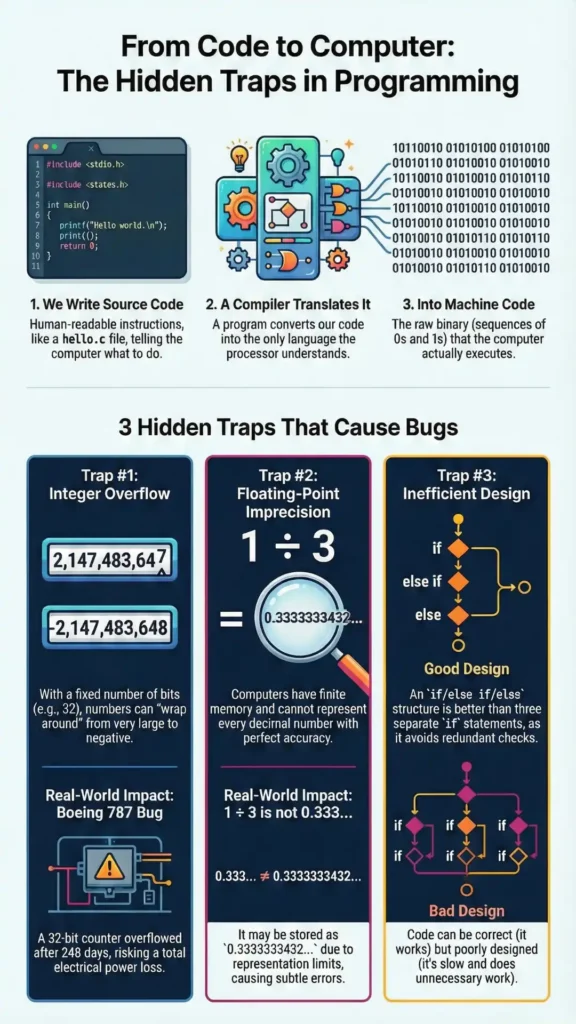
At its core, a computer’s processor only understands one language: machine code, a sequence of zeros and ones. The code you write, whether it’s Python, SQL, or C, is called source code—a human-readable set of instructions. To bridge this gap, a special program called a compiler translates your source code into the machine code the computer can actually execute.
In the lecture, the make hello command is used to compile a C source code file (hello.c) into an executable program (hello) composed of machine code. This compilation step is the key to understanding performance differences between programming languages and tools.
Data Science Connection: In my experience, this is one of the most overlooked sources of performance bottlenecks on data teams. Interpreted languages like Python often hide this compilation step, but many high-performance data science libraries (like NumPy or pandas) are written in compiled languages like C for a reason. Think of a for loop in pure Python to calculate a moving average over millions of rows—it could take minutes. The equivalent NumPy function, which calls pre-compiled C code, executes in milliseconds. That’s the performance gap we’re talking about. This is why you must understand this distinction to choose the right tools and avoid crippling bottlenecks in your data pipelines.
“computers of course don’t understand source code they only […] understand like zeros and ones that is it the so-called binary system so somehow we’ve got to get what already looks cryptic into something that looks at a glance even more cryptic the zeros and ones the computers do understand.” – Harvard CS50x 2025 (YouTube) — Lecture: C
2. The Command Line Isn’t Archaic, It’s Power
You likely interact with computers through a Graphical User Interface (GUI)—the world of icons, windows, and mouse clicks. The Command Line Interface (CLI), or terminal, can feel like a “step backwards” into a purely text-based environment. However, the CLI offers a level of power, efficiency, and automation that is impossible to achieve with a GUI, which is why it remains the preferred environment for many developers.
The lecture introduces a few essential commands that form the basis of file system navigation and manipulation: ls (list files), cd (change directory), mv (move or rename a file), and rm (remove a file).
Data Science Connection: CLI proficiency is non-negotiable for serious data work. It’s the primary way you will interact with the remote servers where your data and models live. It’s essential for automating data pipelines with scheduling tools (like cron jobs), managing cloud resources on AWS or GCP, and using version control systems like Git to ensure your work is reproducible. A GUI is fine for local exploration, but automation and reproducibility live on the command line.
3. A Framework for Quality: Correctness, Design, and Style
Evaluating code isn’t a simple “it works” or “it doesn’t” proposition. The lecture provides a simple yet powerful three-part framework for assessing the quality of any program, which applies just as well to a data analysis script as it does to a C application.
- Correctness: Does the code produce the intended result? If you ask it to calculate a mean, does it return the right number? This is the baseline for any functional code.
- Design: How well is the code written? Is it efficient and logical? The lecture gives an example of poor design: explicitly checking
if x == yafter you have already checked forx < yandx > y. Logically, equality is the only remaining possibility, so the final check is redundant. - Style: Is the code readable and aesthetically pleasing for other humans? This includes things like consistent indentation, clear variable names, and logical spacing, which have no impact on the computer but a massive impact on maintainability.
Data Science Connection: This framework is something I use in every code review for a data pipeline. A pipeline can be correct (it produces the right report) but poorly designed. A poorly designed pipeline might re-read a 10 GB CSV file from disk inside a loop for three different processing steps, instead of reading it into memory once. Both are ‘correct,’ but one is orders of magnitude slower and more expensive. Similarly, bad style in a data context isn’t just messy indentation; it’s a 500-line SQL query with no comments, CTEs named temp1, temp2, and crucial business logic buried in a subquery six levels deep. It’s unmaintainable.
4. Don’t Repeat Yourself: Abstraction Through Functions and Libraries
A core principle of effective programming is abstraction: solving a problem once and then packaging that solution for reuse. This avoids repetition and makes code easier to read and maintain. The lecture highlights two primary forms of abstraction.
The first is using libraries. Including a line like #include <stdio.h> or #include <cs50.h> grants a programmer access to a library of pre-written, pre-tested code. This means they can use powerful functions like printf (to print to the screen) without having to write the complex underlying code from scratch themselves.
The second is creating custom functions. In a simple but illustrative example, the lecture creates a meow function to contain the logic of printing “meow” to the screen. By calling meow() three times instead of printf("meow") three times, the main part of the program becomes cleaner and more clearly expresses its intent.
Data Science Connection: This principle is the bedrock of the entire modern data science ecosystem. We don’t write our own code to create data frames or run regressions from scratch; we use libraries like pandas, NumPy, and scikit-learn. On a smaller scale, you must apply the same thinking to your own work. If you repeatedly find yourself using regex to extract a product ID from a messy text field, encapsulate that logic in a def extract_product_id(text): function. Your main analysis script becomes cleaner, and that function can now be reused across multiple projects.
5. The Billion-Dollar Bug: Integer Overflow
The lecture presents a powerful demonstration: a program starts with the number 1 and repeatedly asks the user if they want to “double it and give it to the next person.” The number grows exponentially into the billions, then suddenly becomes a large negative number, and finally drops to zero. This isn’t a logical error in the code; it’s a fundamental limitation of the computer.
This phenomenon is called integer overflow. Computers store integers using a fixed number of bits (e.g., 32 bits). A 32-bit integer can only represent numbers up to about 2 billion. When you try to add 1 to that maximum value, there’s no more space. The bits “wrap around,” and the massive positive number becomes a massive negative number, causing a catastrophic, silent error.
This isn’t just a theoretical problem. The lecture references a real-world issue with the Boeing 787, where a software counter tracking time would overflow after 248 days of continuous operation, potentially causing the plane to lose all electrical power.
Data Science Connection: A classic, costly mistake I see junior analysts make is ignoring the risk of integer overflow. This is why you must be vigilant about choosing appropriate data types. Database administrators are careful to choose BIGINT instead of INT for primary keys (like user IDs) that could one day exceed 2 billion. Imagine summing a transaction column that overflows; your final financial report would be dramatically, silently incorrect. Always be aware of the limits of the data types you’re using.
6. Lies Your Computer Tells: Floating-Point Imprecision
Just as integers have a finite number of bits, so do floating-point numbers (the numbers with decimal points, stored as float or double). This leads to another subtle but critical issue: floating-point imprecision.
The lecture provides a clear example: when a program divides 1 by 3, the result isn’t an infinite series of 0.333333.... Instead, it might be something like 0.3333333432... after a certain number of decimal places. The root cause is the same: with a finite number of bits, a computer cannot represent all possible real numbers with perfect accuracy. It stores a very close approximation, but the tiny difference can have major consequences.
Data Science Connection: Ignoring this will lead to silent, maddening bugs in your analysis. A simple check like if column_a == 0.3 might unexpectedly fail because the value is actually stored as 0.29999999999999998. These tiny errors can accumulate during complex calculations, potentially affecting statistical tests, model coefficients, or any task that relies on high numerical accuracy. The best practice is a hard rule: never check for exact equality with floating-point numbers; instead, check if they are within a small tolerance of each other.
What to Apply Today: A 5-Point Checklist
- Review the data types in a key database table. Is an
INTsufficient for a primary key that could grow beyond 2 billion? Consider upgrading toBIGINT. - Write one custom function in your next analysis script to handle a repetitive data cleaning or transformation task instead of copying and pasting code.
- Use a code formatter (like Black for Python or an online SQL formatter) to automatically improve the style and readability of your next script.
- Open a terminal and spend five minutes navigating your project’s file structure using only
ls(list) andcd(change directory). - In your next code review, ask a question about design, not just correctness. For instance, “This query works, but could this logic be simplified to be more efficient?”
Closing Thoughts
While concepts like memory allocation and machine code can feel far removed from building a classification model, they are the foundation upon which all reliable and robust data systems are built. Ignoring them means flying blind to a whole class of potential bugs and performance issues. The CS50 course continues to build on these low-level ideas, moving toward higher-level languages and more complex problems. Acknowledging these fundamentals is the first step toward writing code you can truly trust.
Which of these ‘invisible’ computing details has most likely impacted one of your past analyses without you realizing it?