

The SQL Advantage for Data Queries
This guide shows data analysts and scientists how SQL’s core principles can build faster, more robust, and more maintainable data pipelines than general-purpose Python scripts.
Introduction: The Hidden Cost of “Just Looping Through It”
For many data practitioners, the default approach to a new CSV file is to write a Python script. We open the file, loop through the rows, and manually build up counters or lists to answer what seem like simple questions. While this works, it often leads to slow, brittle code that is difficult to maintain. A few reordered columns in the source file can break the entire script. Answering a slightly different question means rewriting complex loops and conditionals. This imperative, step-by-step approach conceals a more powerful, elegant, and efficient way of working with data. By adopting a specialized language, we can express complex questions more readily and replace 17 lines of fragile Python with a single, declarative line of SQL.
Takeaway 1: Make Your Data Ingestion Robust
One of the most common vulnerabilities in a simple Python data script is accessing CSV columns by their numeric index, like row[1]. This code is fragile because it makes a hard-coded assumption about the data’s structure. If a colleague opens the source spreadsheet and moves the second column to the third position, the script will either crash or, worse, silently produce incorrect results by processing the wrong data.
A more robust solution is to use Python’s built-in csv.DictReader. Instead of treating each row as a list of values, DictReader treats it as a dictionary where the keys are the column headers from the first row of the file. This allows you to access data by its meaningful name (e.g., row['language']), not its arbitrary position. The code will now work correctly even if the columns are reordered, as long as the header names remain the same.
Data Science Connection: This practice makes data ingestion pipelines significantly more resilient to changes in source files. It reduces unexpected bugs, minimizes maintenance, and ensures that analytical results are based on the correct data columns, improving the reliability of the entire workflow.
Takeaway 2: The Declarative Mindset Shift
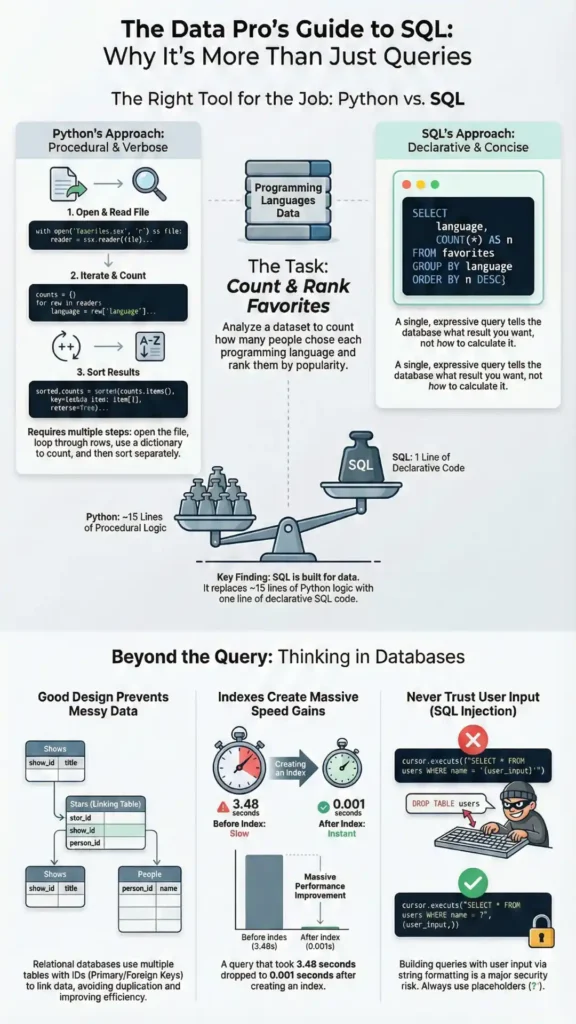
A fundamental difference between Python and SQL is the programming paradigm they encourage. Python is primarily imperative—you tell the computer how to get an answer step-by-step. To count favorite programming languages from a CSV, the Python approach involves initializing counter variables, opening a file, looping through each row, and using if/elif statements to increment the correct counter. This process, which can take around 17 lines of code, is verbose and details a specific procedure.
SQL, in contrast, is declarative—you declare what answer you want, and the database engine figures out the most efficient way to get it. The same counting task in SQL is a single statement: SELECT language, COUNT(*) FROM favorites GROUP BY language;. This query doesn’t specify loops or conditionals; it simply states the desired result: a count of entries for each language. This shift from describing a process to describing an outcome is a powerful mental leap.
Data Science Connection: Thinking declaratively allows analysts to express complex data questions more directly and with less room for logical errors. Instead of building intricate procedural loops, you can focus on defining the data you need, leading to cleaner, more readable, and more accurate queries.
“…it seems like we’re spending an awful lot of time sort of building this up when it would be nice if we could maybe simplify this code… it’d be nice to be able to answer that super quickly…” — Harvard CS50x 2025 (YouTube) — Lecture: SQL
Takeaway 3: Good Data Shape Isn’t Accidental
The structure of your data dramatically impacts your ability to analyze it correctly and efficiently. A common mistake, illustrated with a spreadsheet for the TV show “The Office,” is to store related data poorly. One bad design involves adding a new column for each star (star1, star2, etc.), which is inflexible and doesn’t scale. Another flawed approach is to have a row for each star, repeating the show’s title (“The Office”) over and over again, creating massive data redundancy.
The solution is a core database concept called normalization. Instead of one messy table, you break the data into distinct tables for distinct entities. For example, you create a shows table for TV shows and a people table for actors. You then create a third “join table,” stars, that links them together using their unique IDs (show_id and person_id).
This design eliminates redundancy by replacing long, variable-length text strings like “The Office” with small, fixed-size integers (e.g., a 32-bit or 64-bit ID). This approach saves significant space and improves performance.
Data Science Connection: Normalization provides a powerful mental model for data cleaning and structuring. Recognizing and fixing redundancy in messy datasets (like spreadsheets) helps prevent analytical errors and ensures that aggregations and joins produce correct results. It’s a foundational step in preparing data for reliable analysis.
Takeaway 4: The One-Line Performance Fix
Slow queries are a major bottleneck in data analysis, especially on large datasets with complex relationships. A query joining three tables to find all of Steve Carell’s TV shows, for instance, took an “annoyingly long” 3.483 seconds to run in the lecture. This delay happens because, without guidance, the database performs a linear search—checking every single row in a table to find matches.
The solution is to create an INDEX on the column being searched. An index is a special data structure, much like the index at the back of a book, that allows the database to find specific rows almost instantly without scanning the entire table. By running a command like CREATE INDEX name_index ON people (name), you instruct the database to build an efficient lookup structure (typically a B-tree). In the lecture’s example, creating two indexes reduced a query for Steve Carell’s shows from 0.215 seconds to just 0.001 seconds—a massive performance gain.
The trade-off is that indexes consume more storage space and can slightly slow down write operations (INSERT, UPDATE, DELETE), as the index must also be updated. However, for read-heavy analytical workloads, the benefit to SELECT speed is almost always worth it.
Data Science Connection: Understanding indexes gives data practitioners a simple, high-impact tool to combat performance bottlenecks. When faced with slow queries on large datasets, creating an index on the filtered columns is often the first and most effective optimization step.
Takeaway 5: Stop Trusting User Input
Building queries by inserting user input directly into a string, for instance with Python’s f-strings, creates a severe security vulnerability known as a SQL injection attack. This occurs when a malicious user provides input that is executed as part of the SQL command itself.
The classic example involves a login form. If the code constructs a query like f"SELECT * FROM users WHERE username = '{username}'", a user could enter a username of admin' --. The single quote closes the string, and the -- starts a SQL comment, causing the rest of the original query (including the password check) to be ignored. The database is tricked into logging the user in as ‘admin’ without a valid password. This is famously alluded to in the “Little Bobby Tables” webcomic.
The solution is to always use parameterized queries. Instead of using f-strings, you use a placeholder (like ?) in your SQL string. You then provide the user’s input as a separate argument. The database library ensures that the input is treated strictly as data and never as executable code, completely preventing SQL injection attacks.
Data Science Connection: This is a critical security practice for anyone building interactive data applications, dashboards, or any tool that queries a database based on user-supplied filters or inputs. Failing to parameterize queries exposes your data and systems to significant risk.
What to Apply Today
- When reading a CSV in Python, use
csv.DictReaderinstead of accessing columns by number. - Before writing a Python loop to aggregate data, ask: “Could this be a single
GROUP BYquery in SQL?” - If you see the same text value repeated many times in a spreadsheet, consider splitting the data into two tables linked by a unique ID.
- If a
SELECTquery with aWHEREclause is slow, create anINDEXon the column(s) in theWHEREclause. - Never use f-strings or string concatenation to add user input to a SQL query. Always use placeholders.
Closing
While it’s easy to reach for a general-purpose language like Python for every task, this lecture from CS50 demonstrates that fundamental computer science concepts offer powerful, practical advantages for data work. This lecture is just one part of a comprehensive series that demonstrates how foundational topics in computing directly improve the quality and efficiency of data analysis. By embracing SQL’s declarative nature, sound data modeling principles, and performance features, data practitioners can write code that is not only faster but also more robust and easier to understand.
What’s one routine data task you perform in Python that might be a single, declarative SQL query instead?